Refer partners or friends to MantaProxy and earn commission on qualifying transactions. This guide follows the dashboard Referral program from invitations to commission records, settlement and withdrawals.
This guide follows the current referral prototype: customers registering through your link or code remain permanently attributed, with commission up to 15%. Screenshots use Chinese prototype data. Check your account rate, withdrawable amount and processing status.
1. Open the referral program
Sign in and open Referral program (推荐计划) in the sidebar. It contains an earnings overview, referral link and code, commission records, invited customers and withdrawal history. New users can create a MantaProxy account first, then check the available program entry.
https://dashboard.mantaproxy.com/login
2. Get your link and referral code
- In the referral link and code panel, use Copy link (复制链接) for your complete registration link, or Copy (复制) beside your code.
- Share your own link or code with relevant users and retain its referral parameters. Do not use example codes from screenshots or another account.
- The customer must register through your link or enter your code during registration to establish attribution. The prototype specifies permanent attribution.
- Check Invited customers (邀请客户列表). For existing accounts, missing referral details or disputed attribution, ask support; do not promise automatic retroactive linking.
3. Understand commission and settlement
- Rate: the program offers up to 15%. Use the rate on your account and transaction record; the maximum is not guaranteed for every account.
- Accrual: the prototype describes real-time commission on top-ups and renewals and also shows new purchases in the ledger. Verify each source, eligible amount, rate and commission; do not independently count both a top-up and later spending twice.
- Permanent attribution: customers registering through your referral remain linked to you and later qualifying transactions can continue to earn commission. Attribution alone does not generate earnings without qualifying activity.
- Settlement: the pending card says automatic settlement next Monday. Real-time accrual and settlement are separate stages; pending earnings are not already withdrawable.
- Payouts: track an application in withdrawal history. Settlement and payout completion are separate; submission does not guarantee immediate receipt. Follow any eligibility, fee and processing requirements on the current form.
Calculation example: an eligible amount of USD 100 at an applicable 15% rate produces USD 15 commission. This illustrates arithmetic, not a promise of earnings.
4. Read the earnings overview
| Metric | Meaning and checks |
|---|---|
| Withdrawable commission | Currently available to request; compare it with your requested amount. |
| Total commission | Historical earnings, not necessarily the currently withdrawable amount. |
| Successful referrals | Attributed customers; review active paying customers and the customer list too. |
| Pending settlement | Commission awaiting settlement; check the date shown on the card. |
5. Review customers, commissions and payouts

- Commission ledger (返佣流水明细): review transaction reference, source customer, spending amount, rate, commission, posting time and status.
- Invited customers (邀请客户列表): review registration, cumulative top-up contribution, generated commission, registration date and current status. Registration without spending does not itself generate commission.
- Withdrawal history (提现历史记录): check reference, destination, amount, request date and payout status. Distinguish an application from a completed transfer.
- Search by reference, customer email or description and filter active/credited or under review/pending records. Use Export report (导出报表) for reconciliation; keep customer and transaction data private.
6. Transfer to balance or withdraw USDT
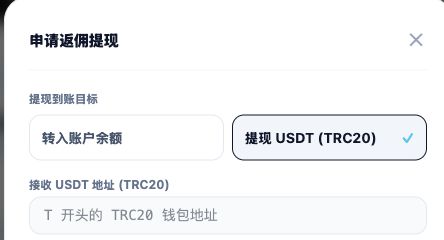
- Check withdrawable commission and choose Request withdrawal (申请提现).
- Choose Transfer to account balance (转入账户余额) for platform funds, or Withdraw USDT (TRC20) and enter your verified compatible receiving address. These are different destinations.
- Enter the amount in USD or choose Withdraw all (全部提现). Review available funds, destination, address and displayed requirements. A prefilled example is not evidence of a minimum withdrawal.
- After checking, submit the application (提交提现申请). Track it in withdrawal history; check the finance center for a balance transfer or your receiving wallet for USDT.
Verify the receiving address and TRC20 network before confirmation. This guide provides no collection address. Never share account passwords, verification codes or wallet private keys.
7. Follow promotion rules
- Promote to users with a real need through content, communities or SEO. Describe static ISP, static native residential and datacenter proxies accurately.
- Do not use self-referrals, fake registrations, fabricated transactions or other manipulation to earn commission.
- Do not impersonate the official service or promise fixed income, unlimited capacity or unconfirmed features. Dynamic products remain internally planned and must not be advertised as currently purchasable.
- Follow channel and affiliate requirements. Do not bid on MantaProxy branded search terms; confirm permitted methods before paid promotion.
8. Resolve common issues
- Customer missing: check your complete link or registration code, clear filters and give support the necessary attribution details.
- No commission: confirm qualifying activity and check the ledger source, rate and status. Referral counts are not commission income.
- Pending earnings not withdrawable: check the next-Monday settlement notice and record status, distinguishing accrual, settlement and payout.
- Payout missing or amount differs: compare reference, request time, amount, destination and status; contact support if needed. Hide customer emails and full wallet addresses in unrelated screenshot areas.
Continue with: Registration and login · Payment methods and billing rules.