Purchasing, renewal and wallet top-up serve different purposes. A purchase adds proxies, renewal extends existing resources, and a top-up adds available wallet funds. This guide explains payment options, amount checks and transaction results.
Screenshots show the Chinese dashboard prototype. Amounts, dates, counts and offers are examples. Available channels, currencies, fees, processing times and final totals depend on the live checkout and transaction records.
1. Choose a payment method for your task
| Method | Where to use it and what to check |
|---|---|
| Wallet balance | Available for purchases and renewals. Check available funds against the total; top up or choose another available channel if needed. |
| Alipay | Shown in purchase, renewal and top-up prototypes. Follow the live payment instructions. |
| PayPal | Shown in purchase, renewal and top-up prototypes. Verify recipient details, currency and amount after the redirect. |
| USDT | Purchase and renewal prototypes specify USDT (TRC20); the top-up panel shows USDT. Use the network and receiving details specified by the current payment page. |
2. Pay a purchase or renewal order
- For a purchase, verify region, product, quantity and duration. For renewal, check target resources, instance count, period and estimated new expiry.
- Select an available method, review the total and automatic renewal switch, and read the agreements and information provided on the page.
- Submit once the order is correct and follow the channel instructions. Return to the dashboard to check the transaction, then verify new resources or expiry dates in Static proxy management.
3. Top up your wallet
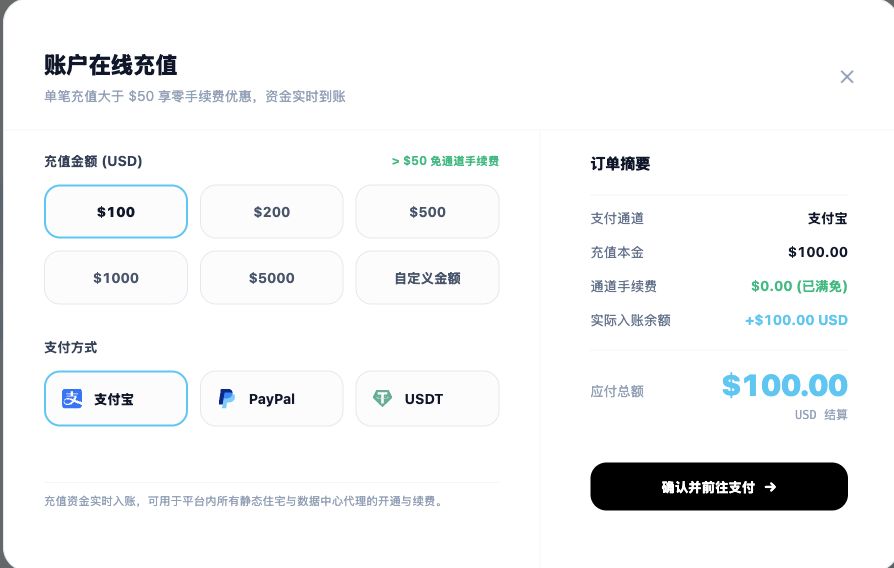
- Open Billing management (账单管理) in the sidebar and choose Online top-up (在线充值).
- Choose a preset amount or Custom amount (自定义金额). The prototype displays amounts in USD.
- Select Alipay, PayPal or USDT. In Order summary (订单摘要), review principal, channel fee, actual wallet credit and amount due.
- After checking the summary, choose Confirm and proceed to payment (确认并前往支付). Return afterwards to check both transaction status and available balance.
A successful top-up does not purchase proxies. It adds account funds; you still need to submit the relevant purchase or renewal order.
4. Understand billing and order amounts
- Static ISP, static native residential and datacenter proxies: the purchase amount depends on region, specification, IP count, duration and current offers. Use the order breakdown rather than estimating from a starting price alone.
- Renewals: review the selected resources and period, especially the instance count, estimated new expiry and total.
- Top-ups: distinguish principal, channel fee, actual wallet credit and amount due. The amount paid is not necessarily the amount credited.
- Currencies and offers: the prototype uses USD. If checkout shows conversion or fees, review its settlement amount. The fee waiver shown in a screenshot is not a permanent rule.
5. Check USDT payment details
- Check the currency and network required by this order and make sure the sending and receiving networks match. Do not send assets on a different network.
- Obtain receiving details from the current payment page. Check the address, amount and any displayed validity period; do not reuse an old order address.
- Save the order number and transaction hash (TxID), then check the dashboard. If processing is pending, review existing records before sending again.
6. Review transactions and export statements

- Use Account top-ups (账户充值) and Proxy spending (代理消费) in the finance center. Search by transaction number, order description or amount, and filter by method or settlement status.
- Review transaction number, time, business type, description, method, amount change, balance after posting and status. Scroll the table horizontally for hidden columns.
- Completed and Processing indicate different stages. Compare the payment provider record, wallet balance and resource result; a closed payment window or redirect alone does not confirm success.
- Use View receipt (查看凭据) for a transaction, or Export billing details (导出账单明细) and Export statement (导出对账单) for reconciliation. Keep exported transaction records private.
7. Understand automatic renewal charges
- The management panel says enabled automatic subscription charges the balance before expiry to extend service. Maintain enough available funds and review renewal charges in the finance center.
- Paying once with Alipay, PayPal or USDT does not by itself authorize future automatic charges through that external channel. Check the resource subscription setting separately.
- Disabling automatic subscription means service stops at expiry. Renew manually in advance for continued use; actual charge timing and results follow the current page and order records.
8. Resolve payment issues
- Paid but still processing: check the account, transaction number and receipt. Give support the order number, payment time, channel, amount and page message; include the TxID for USDT if applicable.
- Top-up succeeded but no proxies: place a purchase or renew existing resources, then check the appropriate list.
- Unexpected amount: distinguish top-up from spending, then check quantity, period, offers, fees, currency and actual credit.
- Insufficient funds or incomplete payment: review existing status before topping up or choosing another available channel; avoid duplicate payments.
- Refunds or invoices: ask support about eligibility and the procedure for your order under the applicable platform rules. Hide unrelated passwords, verification codes and full payment account details in submitted material.
Continue with: Purchasing products · Proxy management.