Manage purchased static ISP, static native residential and datacenter proxies in the dashboard. This module separates daily tasks so you can find resources, retrieve connection details and arrange renewals.
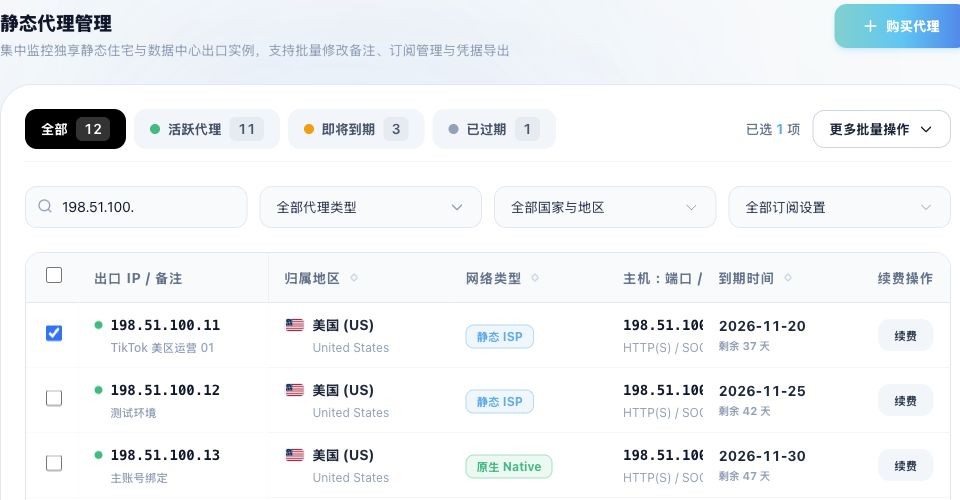
Images show the Chinese management prototype with demonstration data. Counts, IPs, amounts and dates illustrate the workflow; use your actual dashboard.
1. Open proxy management
Sign in and open Static proxy management (静态代理管理), or follow the purchased-proxy management link from the purchase page. The help module is named Proxy management; use the menu label shown in your dashboard.
https://dashboard.mantaproxy.com/login
2. Check your purchase
- Confirm you are signed in to the purchasing account and the order is complete.
- Check quantity, product type, country or region, connection host and expiry in the list.
- Retrieve the connection details and verify one proxy in your tool before configuring a batch.
3. Choose a task guide
Choose a guide for your current task:
- Find, search and filter proxies — Find resources by status, IP, port, remark, type and region, and check pagination and selections.
- View and copy connection details — Click an exit IP to open the details drawer, copy fields or a full connection string, and configure compatible clients with the QR code.
- Copy and export proxies in bulk — Choose selected or all resources and generate HTTP or SOCKS5 strings as TXT, CSV or JSON.
- Select proxies and manage remarks — Check selected resources, update remarks in bulk and identify projects or purposes.
- Manually renew existing proxies — Start a single or bulk renewal and check resources, duration, charges and new expiry.
- Automatic renewal and subscriptions — Enable or disable automatic subscriptions for one or more resources and check balance and results.
- Resource status and expiry — Review active, expiring and expired resources, plan renewals and resolve post-expiry connection issues.
4. Listed resources do not connect
List status describes resource and expiry management; it does not guarantee access to a target site. Check validity, host, port, protocol and authentication, then verify the exit IP from the actual tool. Continue with the troubleshooting FAQ if needed.
Related guides: Protocols and configuration FAQ · Connection troubleshooting FAQ · Purchasing, payment and expiry FAQ