Choose the required resources before selecting a connection format and protocol. An export retrieves connection details; it neither buys resources nor changes instance configuration.
Images show the Chinese management prototype with demonstration data. Counts, IPs, amounts and dates illustrate the workflow; use your actual dashboard.
1. Select export scope
- Select the proxies and verify their identity and the selected count.
- Open More bulk actions → Export proxy format.
- Choose Current selection or All proxies as needed. Check preview and count rather than assuming All refers only to the current page or filters.
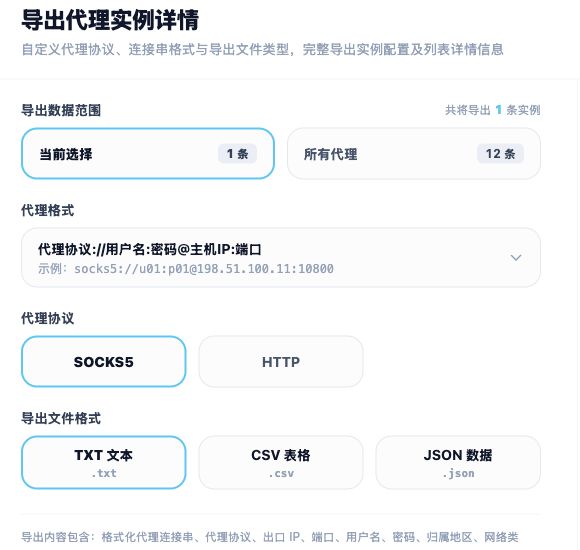
2. Choose format and protocol
- Use separate host, port, username and password fields where required, or choose the string format expected for bulk imports.
- Choose HTTP or SOCKS5 supported by both the resource and tool. This generates export content; it does not change the instance protocol.
- Do not assume any identical port works for HTTP and SOCKS5; check the actual resource details.
- Choose TXT, CSV or JSON. File type and connection-string format are different settings.
3. Preview, copy or download
- Check host, port, authentication fields, delimiters and resource count in the preview.
- Use Copy all content or the relevant download button.
- Import one entry and verify the exit and target site before importing the rest.
4. Store exports and check import problems
Exports may contain proxy credentials. Redact them before sharing and keep original files out of public locations. For import failures, check format, protocol, delimiters and extra spaces. A successful export does not prove the resource has not expired.
Related guides: Proxy management overview · Protocols and configuration FAQ · Connection troubleshooting FAQ · Purchasing, payment and expiry FAQ